
Modernize the Work Behind the Grid
Real-time visibility into every crew. Payments tied to verified work. Every contractor's terms enforced automatically. Every dollar traced and rate-case ready.
Click a crew, open a work order, move around the board. Every crew located in real time, colored by the contractor supporting it.
You are accountable for crews you do not employ
Contractors, each with their own system and their own reporting format. Your own crews on something different again. No one board holds all of them.
Today's status comes from a phone call, an emailed spreadsheet and a portal a week behind. Crews sit idle because nobody knew where they were. Work goes out to a crew that should not have had it.
And what was done, on which circuit, by whom, arrives with the invoice. By then the cycle has moved on and the crew has gone. A cost you cannot trace to approved scope is a cost you cannot defend in a filing.
Know what is happening in the field right now
Every crew on one board - the ones you employ and the ones you don't. Status comes from the record, not a phone call.
See it on the live boardOne board for every crew
Internal and contractor crews together, colored by who supports them, with real-time locations from vehicle telemetry.
View all crews, or one contractor
Their work and their crews together, for when the conversation is with just them.
Answer for any day in the last 30
Thirty days of each crew's travel and activity, on the record, when somebody asks what happened.
Storm work on the same board
Mutual aid crews appear beside your own, under the contractor supporting them.
A week of timesheets, closed without the chase
The most time-consuming part of managing contract labor, cut down to a review. Hours are entered once, in the field, by the crew that worked them.
How timesheets workNobody has to be chased
You see who has submitted and who has not, while the week is still open.
Reviewed in batches, not one by one
A whole crew's week approved at once, with a status and a name on the decision.
Errors cannot hide
A correction to an approved week is visible and goes back through approval - it never quietly becomes the new number.
Overtime validated, per contract
Crews select their hour types; CORE validates every entry against that contractor's contract - even when no two contracts read the same.
Safety that happens with the work, not after it
Briefings, forms and job-site conditions are part of the work record itself - enforced as the work progresses, and visible to you across every contractor.
How safety worksBriefings and JHAs on the record
Recorded against the work order, prefilled from the job itself - not paper in a truck.
Required forms, enforced
Safety, vehicle and regulatory forms configured to your mandates and completed as work progresses.
Conditions captured on the spot
Delays, weather, access and hazards recorded with photos, the day they happen.
One safety standard, every contractor
The same requirements for your crews and theirs, and you can see compliance across all of them.
Built for a right of way with no signal
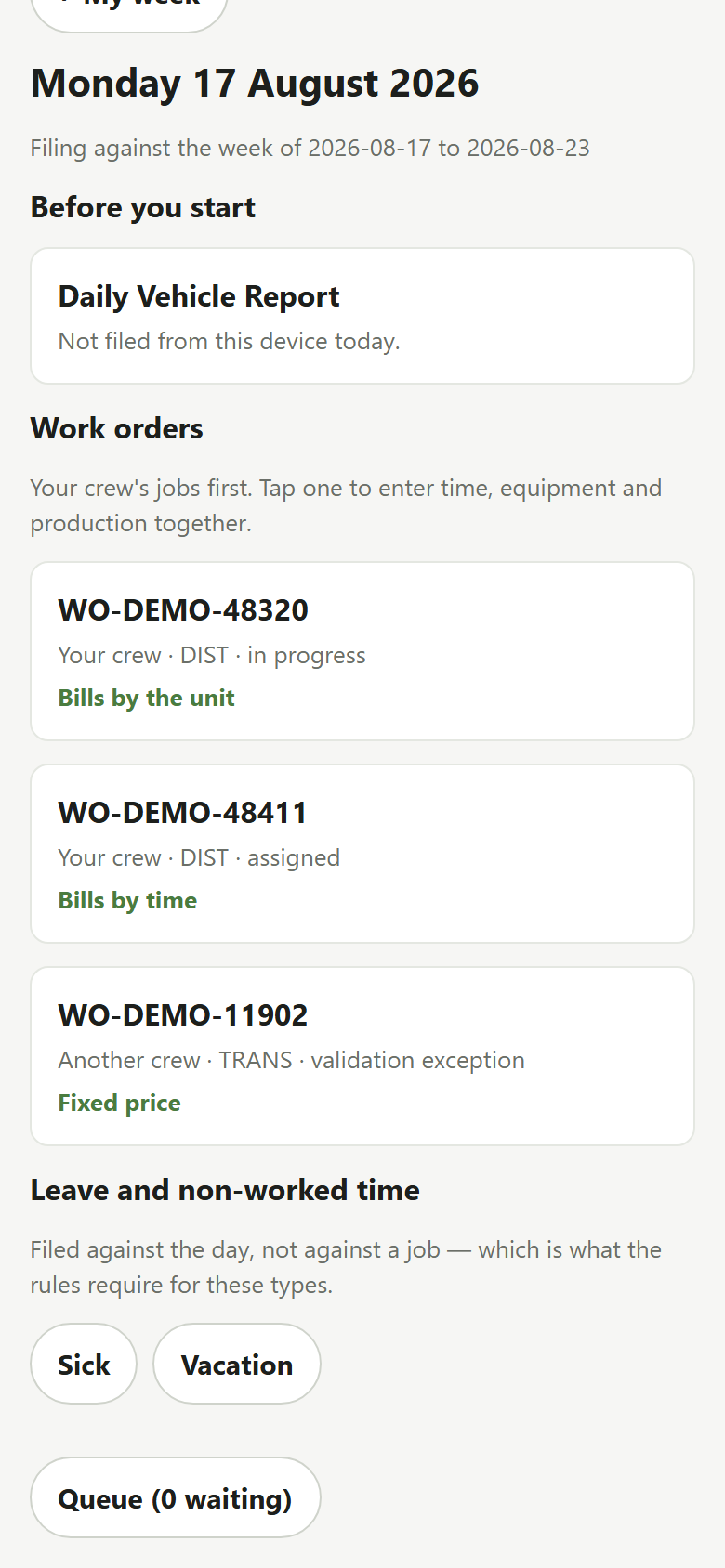
A phone and tablet app for the people doing the work. The day is entered once, in the field, in minutes - and everything on this page starts from what it captures.
Works offline
Work is captured without coverage and syncs when signal returns - under the same rules, so the field and the office can never disagree.
One entry, everything together
Units, hours, equipment and production recorded against the work order in one pass - no paperwork to redo at the yard.
Safety files with the day
Daily vehicle reports, briefings and forms completed as the work happens, on the same screen.
Hours checked as they are entered
Crews pick their hour types; the contract validates them on the spot, before the week reaches review.
Six more reasons utilities choose CORE
Catch problems while they are cheap
Work is checked as it is captured, so an over-scope unit surfaces the day it opens - not at invoice.
Pay for exactly what was done
Contractor charges are built from verified field activity, and every line traces to a unit, a rate and an approval.
Defend every dollar
A permanent trail from each dollar back to approved scope - ready for the auditor, the regulator and the rate case.
One standard for every contractor
One reporting format and each contract's own terms, enforced automatically. No more format-per-contractor, and nobody sees each other's rates.
Built for your complexity
Contractors on different contracts, three programs at once, storm on top of it all. Each contract's terms are built into the controls, so adherence is automatic.
Simple where it counts
Crews enter work once, in minutes. The back office stops re-keying. Approvals happen in one place.
Who uses CORE
Four roles work the same record. The program manager is accountable for all of it; the other three are the people whose work has to reach them without being entered twice.
Utility program managers
Contractors, your own crews, a cycle plan, a regulator.
Stops: not knowing what was actually done, on which circuit, by whom, until the invoice arrives.
Contractor operations & general foremen
Twenty crews, a hundred and fifty open work orders, a week of timesheets to review.
Stops: hours that cannot be billed, and crews idle because nobody knew where they were.
Foremen in the field
A crew, a truck, a day of spans.
Stops: doing the paperwork twice, and being asked at week's end what happened on Tuesday.
Back office - payroll, billing, compliance
Closing a week, producing a cost report, filing.
Stops: numbers that move after they were approved, with nothing to explain why.
Ready to take the next step?
See the platform in action
See the whole platform, or go straight to the part that matters to you. We build the walkthrough around your processes, your systems and your priorities.
Book a demoMeet our energy & utilities team
Talk through your challenges and priorities with utility industry specialists, and pinpoint where CORE drives measurable improvement in your programs.
Request a consultationWhat a utility gets out of CORE
Nine ways your programs will run better - pick one, and see it beside the platform. For step-by-step walkthroughs of the major functions, see the walkthroughs.
{{ selTitle }}
{{ selLead }}
{{ it.h }}
{{ it.b }}
{{ selShotNote }} Captured from the platform, with sample data - try it live on the home page.
Works with what you already run
Field data is checked as it is submitted and sent on to the teams and systems that need it, so the spreadsheets and month-end reconciliation between them stop.
Connect your and your contractor's systems:
Your GIS - circuits and spans come straight from Esri, so work is recorded against the real line rather than a nearby address.
Your payroll system - approved hours sent as a recorded handoff, so a failure is caught before payday. Contractors download reports for their own payroll systems.
Your work management system - work orders and asset data exchanged with the WMS your operations already run on.
Your procurement platform - contractor charges flow to Ariba, Coupa or whatever your purchasing runs through.
Your company sign-in - staff use their existing work accounts. No separate password to manage or revoke.
Your contractors' systems - contractors who run their own software can connect it and submit work in your format, under your rules. They keep their tools; you keep one standard.
Everything else - a documented connection for your asset, financial and reporting systems, under the same rules.
See the parts that matter to you
We build the walkthrough around your programs, your contract terms and the systems you already run.
Book a demoA phone and tablet app for crews, with offline capture · a dashboard home for general foremen · equipment hours on the invoice · a straight-time cap per contract · timesheet comments and attachments.
How the major functions work
Step by step, in the order it happens on the ground. Pick a function to open its walkthrough - the full version runs live in a demo, on realistic sample data.
{{ f.lead }}
See it in a walkthrough{{ st.h }}
{{ st.b }}
See these walkthroughs run live
Book a demo and we will run them on the live platform, with realistic sample data. Nothing to prepare on your side.
Book a demoDispatch and crew management · scoping · storm events and mutual aid · work order imports · contractor workspaces · approvals and change history - covered under the benefits and in the walkthrough.
Three programs, one platform
Vegetation, construction and storm work differ in how the work is measured - units, time and materials, or both - how it is priced, and what tends to go wrong. They do not differ in needing the work, the hours and the money to agree.
Vegetation management
Cycle trim along a circuit, span by span, at high volume and low value per unit.
A program manager cannot answer late what was actually trimmed, on which circuit, by whom. Cycle work produces thousands of small units, so the detail is exactly what a summary throws away - and the summary is usually what arrives.
Scoping produces the work
Walk the circuit, record what you found, and the work orders come out of it rather than being typed from a list afterwards.
Work lands on the right span
Circuits and spans come from your GIS, so a trim unit is recorded against the conductor it was performed on rather than a nearby address.
Authorized against submitted
Over-scope raises an exception a general foreman resolves, with the decision recorded at its tier.
The cycle is answerable today
What was done and by whom is on the record as it happens, not reconstructed when the invoice lands.
Transmission & distribution
Construction work - pole replacement, conductor replacement - often carrying more than one commercial treatment at once.
The same job number can hold unit-priced, time-and-equipment and lump-sum work in the same week. When the commercial treatment differs, the record of what the crew actually did starts to differ with it, and reconciling that becomes somebody's month.
The contract's billing method locks
Chosen at intake per the contract, and locked once work is submitted against it, so it cannot be reinterpreted later.
Rate tables by job number
With effective dates, so a rate change does not reprice work already recorded.
Equipment hours beside labor
On the same week, against the same work order, and carried onto the invoice through a service-item rate.
Approval levels matched to the money
You set the limits, and every decision is recorded with the level it was approved at and who approved it.
Storm restoration
Emergency restoration outside the cycle plan, with crews that do not normally work for you.
Restoration spends quickly, under conditions nobody planned for, with mutual aid crews arriving from elsewhere. Months afterwards the same spend has to be separable from the cycle and defensible in a filing.
A storm event as a record
Restoration work carried against the event, so it can be reported and recovered separately from cycle work.
Mutual aid crews on the same board
Crews from elsewhere appear with the contractor supporting them, in that contractor's colour.
Double time and per diem where they apply
Hour types and expense types you define, with separate billing and payroll rates.
A cost record that survives review
Every change carries who and when. A withdrawn record stops counting toward hours and money without vanishing from the history.
The contractor and the utility, in the same system
You decide what each side sees. Your team and your contractors work the same records without your contractors seeing each other's commercial detail.
How separation is enforced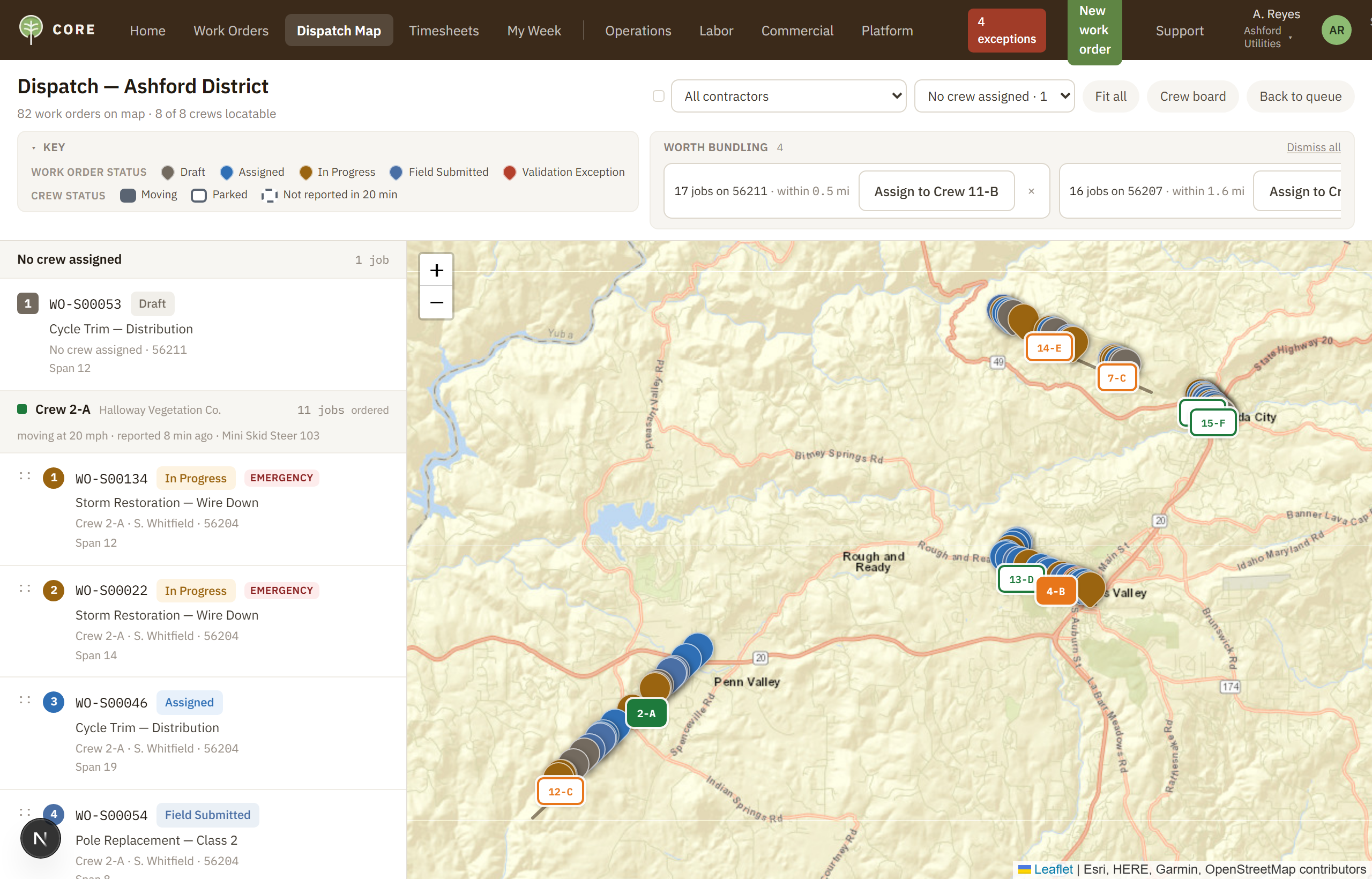
Why you can trust what CORE tells you
CORE calculates what your programs pay, so it has to earn your trust first. Five questions come up in every serious evaluation. Here are the answers, and how each one is enforced.
{{ t.fn }}
{{ t.tech }}
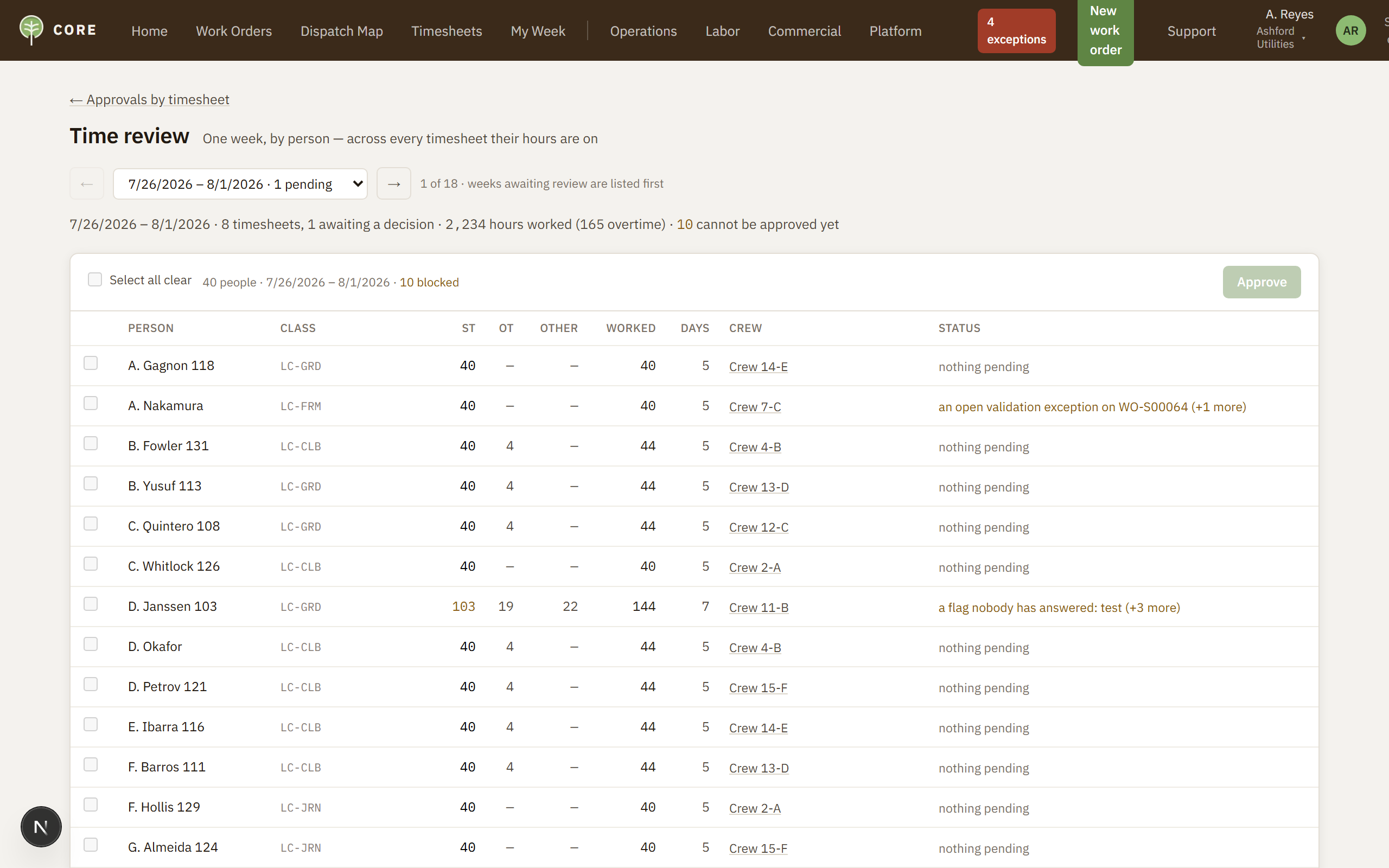
The approvals queue - every decision carries a name and the level it was approved at.
See the enforcement for yourself
Ask for the technical session in your walkthrough - data separation, the change history, and how rule changes are released.
Book a walkthroughThe FAQ covers pricing, implementation, contractor onboarding and data migration.
Priced by the crews you manage
Not per user. The foreman entering a week of hours should not be a line item, and neither should the coordinator who reviews it. You pay per crew per month - your own crews and your contractors' - with every program and every part of the platform included.
How many crews?
Count every crew you dispatch - internal and contractor. Tiers apply automatically as the count grows.
Tiered, so each crew is billed at the rate for its own tier rather than one rate applying to all of them.
Fewer than 25 crews is quoted at the $59 tier with a 25-crew minimum.
{{ annual }} per year · {{ crewCount }} crews
{{ savingNote }}
All three programs - vegetation, T&D construction, storm restoration
The whole platform: field work, labor, commercial, administration
Unlimited users - coordinators, foremen, back office, leadership
Unlimited contractor organizations, with visibility you control
Circuits and spans from your GIS · recorded payroll handoff · company sign-in
All three billing methods, with rate tables by job number
An estimate, not a quote. Final pricing follows a signed order.
How crews are counted
With crew-based pricing the definition matters as much as the rate, so it belongs here rather than on an order form.
A crew is a dispatchable unit with its own timesheet - whether it works for you or for a contractor.
Crews are counted in the months they are dispatched, so seasonal crews carry no charge while they are stood down.
Mutual aid crews brought in for a declared storm event are billed weekly instead - $19 per crew per week, only for the weeks they are on your system.
Every tier includes the whole platform - the crew phone and tablet app, the dashboard home and equipment invoicing included.
Pilots and implementation
No two utilities start the same way, so we begin by working out with you whether a pilot makes sense - and at what level. Pilots, implementation, training and contractor onboarding are priced individually, around what your program actually needs.
Scope the pilot together
We work with you to determine whether a pilot makes sense for your programs, and at what level - one program and one contractor, or something broader.
Pilot for 8–12 weeks
The common approach: run CORE for 8–12 weeks with real work and real timesheets, to understand how it fits your processes and your ecosystem before you commit to more.
Plan the implementation
From what the pilot showed, we build an implementation plan with you - integrating CORE with your systems and configuring it to your requirements: your contracts, rate sheets, hour types, approval limits and contractor list.
Enable your contractors
Our customer success team trains and enables your contractors, and integrates the systems they already run - so the standard you set is one everyone can actually work to.
Each engagement is priced individually. Talk to us about what a pilot would look like for your programs.
The company behind CORE
We build software for the operational side of utility line work - the crews, the hours and the money. It is the only thing we build, and this page is about why that focus matters when you are choosing who to work with.
Why we built CORE
Vegetation management and utility construction have become so complex that managing the administration of the work is now an operation of its own. Contracts, rates, approvals, compliance and reporting consume people who should be running programs - and pull crews into paperwork that has nothing to do with the line.
We built CORE to carry that complexity, so utilities can manage complex work without being consumed by it - and crews can focus on safety and performing the work.
What we already know about your programs
The fastest way to judge a vendor is whether they understand the work before you explain it. These are things we did not have to be taught, and they are the reason the product is shaped the way it is.
Authorized and submitted are different numbers
And the gap between them is where the argument starts. It is a first-class field on the record, not a note somebody adds later.
A storm is not a work type
It is an event with its own cost recovery, its own multipliers and crews who do not normally work for you. It needed its own shape.
Billing methods vary across the work
Unit-priced, time-and-equipment and lump sum run side by side - sometimes on the same job number, in the same week, each with its own rates and rules. A system that assumes one of them forces the others into spreadsheets.
Rates change, and last quarter still has to price correctly
Rate tables carry effective dates, because a rate change that repriced completed work would be worse than no system at all.
A foreman will not enter data twice
If the paperwork is faster on paper, it happens on paper and reaches you late. Field capture had to be quicker than the thing it replaces.
Payroll runs, ready or not
Every utility closes its week differently, and crews work weekends. Whenever the cutoff lands, payroll runs whether the review finished or not - so review had to be faster than the spreadsheet it replaced.
How we work with you
Small team, direct contact, no account management layer between you and the people who build the product.
Start with a walkthroughWe build it around your program
Utilities carry hundreds of contracts, each with its own rates, hour types and terms - all of them imported and made enforceable. Every implementation is designed around your program's setup and its complexity, not a standard template.
Pilot for 8–12 weeks
We work out together whether a pilot makes sense and at what level, then run CORE for 8–12 weeks with real work and real timesheets - to see how it fits your processes and your ecosystem before you commit to more.
Plan the implementation from the pilot
From what the pilot showed, we build an implementation plan with you - integrating CORE with your systems and configuring it to your contracts, rate sheets, hour types, approval limits and contractor list.
We onboard your contractors
Our customer success team trains and enables your contractors, and integrates the systems they already run - so the standard you set is one everyone can actually work to.
You talk to the people who build it
What stops your week from closing goes to the top of what gets built next, and each engagement is scoped and priced around your program.
We will not oversell
If CORE does not do something, we say so - here and in the demo.
Common questions
Asked by program managers, operations leaders and the people doing due diligence. For the deeper answers on trust and enforcement, see how it works.
{{ f.answer }}
Have a question this page does not answer?
Ask it in a walkthrough, or write to us. A member of our utilities team answers personally.
The deeper material lives on how it works - data separation, the change history, and how rule changes are released.
See CORE at work - no prep required
Forty-five minutes on the live platform, running a realistic utility program on sample data: crews on the board, a week of timesheets, a charge you can trace back to the work. You watch it run; we answer questions as they come up.
What a walkthrough covers
Setting up a job and choosing how it bills · a work order held up by a problem · a foreman's week and its review · the payroll handoff · how the rules are enforced, if you want to see it.
Who should be on it
The person who closes a week, the person who answers to the regulator, and whoever will ask how the rules are enforced. Forty-five minutes.
What we will not do
Oversell. If something is not in the platform, we say so in the demo rather than let a screen imply it.
Request a walkthrough
A member of our utilities team answers personally.
{{ formNote }}
Prefer a conversation first?
Talk through your programs and priorities with the energy and utilities team before seeing any screens. utilities@simplifyia.com
Doing technical due diligence?
Ask for the technical session - data separation, the change history, how rule changes are released, and connections. How it works
Want to see CORE now?
CORE is embedded live on this site. Open the platform page and click into it.